Add Chrome ExtensionAdd Edge ExtensionAdd Firefox Extension
Get Extension, Manage SearchAll New Tab - Chrome, Edge and Firefox Extensions
Enable or Disable an Extension in Chrome and Edge
Get Extension, Manage SearchAll New Tab - Chrome, Edge and Firefox Extensions
(Turn On / Off)
Enable or Disable an Extension in Chrome and Edge
- On your computer, open Chrome / Edge.
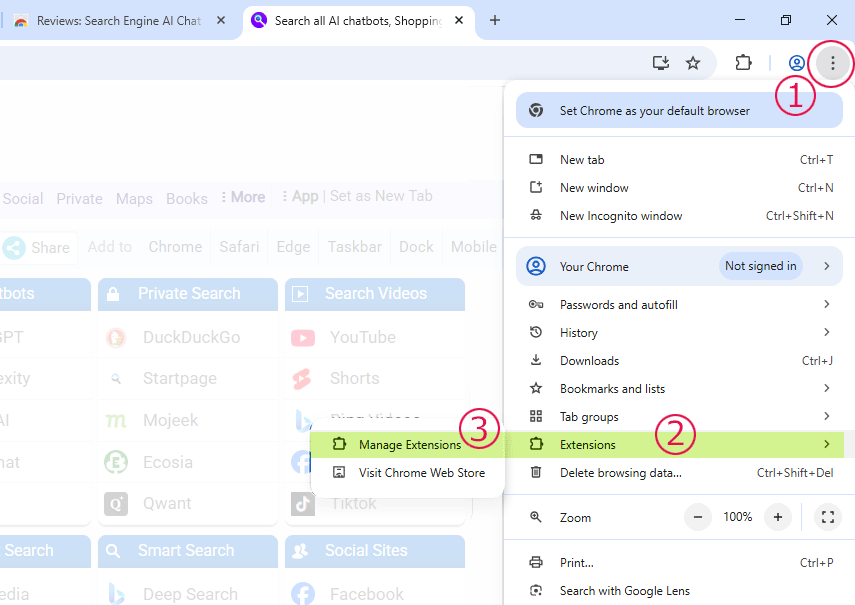
- At the top right, select … ( ⠇) More and then Extensions and then Manage extensions.
- Turn the extension on or off.
- On your computer, open Firefox.
- At the top right, click the menu button (☰) and then Extensions and themes and then Extensions.
- Turn the extension on or off.
Manage the SearchAll.net new tab extension—enable it to search multiple AI search engines and top sites, or disable anytime in your browser settings for basic mode.
In Chrome: Copy and Paste below text into chrome browser address bar and press enter keyIn Edge: Copy and Paste below text into edge browser address bar and press enter key
In Firefox: Copy and Paste below text into firefox browser address bar and press enter key